What's New — 30 August 2026
Over 30 new visual styles, the new Magic MCP that lets your favorite agent create videos for you, and new export options: 4K, 120 fps, transparent backgrounds and audio track toggles.
Three updates today, and all of them are about giving you more ways to make VideoZero yours: a library of new visual styles to shape how your videos look, the Magic MCP — a way to create and edit videos straight from your favorite AI agent — and a set of new export options for getting your video out exactly the way you need it.
Pick a style, any style
Until now, VideoZero decided how your video looks based on your prompt. That works — but sometimes you already know exactly the register you want. Today we are launching over 30 new styles: complete visual worlds with their own palettes, typography and motion language.
Want your explainer drawn live on a whiteboard? A product launch with glassmorphic keynote polish? A dev-log that lives in a terminal, a retro pixel-art level-up, study notes in a doodled notebook, or a manifesto set in timeless Bauhaus geometry? There is a style for it — and each one carries through your whole video, from the first frame to the last.
Browse the full collection on the new styles page — every style has a live preview, and you can jump straight from a style you like into creating a video with it. Or simply name the style in your prompt.
Magic MCP: bring your own agent
You already have an AI agent you talk to every day — so why should making a video mean leaving it? With the new Magic MCP, you don’t have to.
VideoZero now ships a Model Context Protocol server that connects to Claude, ChatGPT, Claude Code, Cursor, or any other MCP-compatible agent. Once connected, your agent can:
- Generate complete narrated videos from a prompt — right in your chat.
- Revise any video with natural-language instructions.
- Author and edit scenes directly for precise, code-level control.
- Search stock media and icons, and keep an eye on your usage.
Setup takes a minute: add the server URL, sign in with your VideoZero account, and ask your agent for a video. In Claude Code it is a single command:
claude mcp add --transport http videozero https://engine.videozero.ai/mcpStep-by-step guides for every client are on the new MCP page.
Export it your way
Your video does not end in VideoZero — it ends in a slide deck, a social feed, a course page, or someone else’s edit. Exports now have their own settings panel so the file you download fits where it is going.
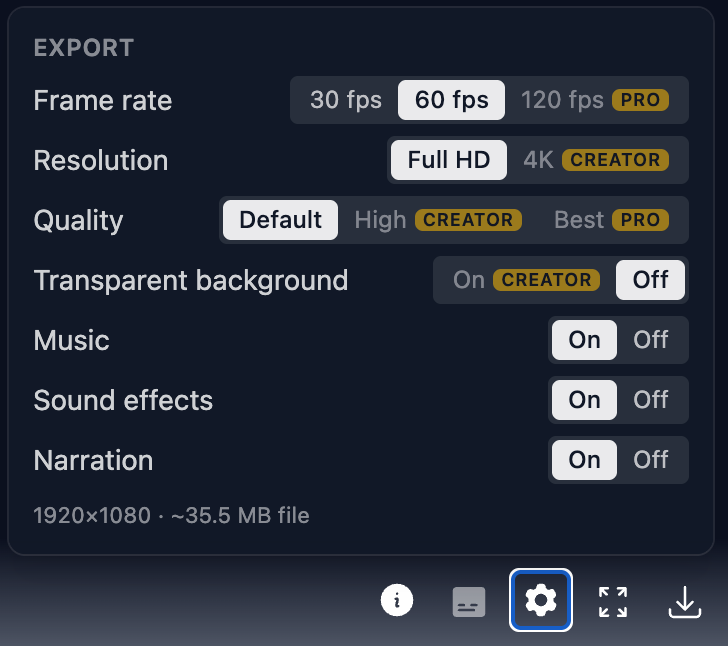
- Higher frame rates. Every video can be exported at 30 or 60 fps, and Pro users can go up to buttery-smooth 120 fps — perfect for high-refresh displays and fast-moving motion graphics.
- Full HD or 4K. Creator and Pro plans can now export in crisp 4K, so your video holds up on big screens and in downstream edits. Higher quality encoding presets are available on the same plans.
- Transparent backgrounds. Also on Creator and Pro: export your video with a transparent background and drop animated titles, diagrams or characters straight onto your own footage, slides or website.
- Choose your audio tracks. For everyone, on every plan: switch narration, music and sound effects on or off individually. Want to record your own voice-over, add the music in your editor, or just keep things quiet? Export exactly the tracks you need.
Find all of it behind the settings icon in the player, right next to the download button.
As always — we would love to hear what you think, and even more, we would love to see what you make. Reach us any time at mail@videozero.ai.